如何用 Transformers 生成文本:语言生成的不同解码方法
How to generate text: using different decoding methods for language generation with Transformers
Hugging Face 博客介绍了自回归语言生成的几种主流解码方法,包括贪心搜索、beam search、采样、Top-K 与 Top-p(nucleus)采样,并给出在 transformers 库中用 GPT2 实现每种方法的代码示例。
系统梳理贪心、beam search 与多种采样策略的取舍,并给出可直接运行的 transformers 代码示例。

注意:2023 年 7 月编辑,附有最新参考文献和示例。
引言
近年来,由于在数百万网页上训练的大型基于 transformer 的语言模型的兴起,包括 OpenAI 的 ChatGPT 和 Meta 的 LLaMA,人们对开放式语言生成的兴趣日益增加。 条件开放式语言生成的结果令人印象深刻,已证明可以 泛化到新任务、 处理代码, 或 以非文本数据作为输入。 除了改进的 transformer 架构和海量无监督训练数据外,更好的解码方法也发挥了重要作用。
这篇博客文章简要概述了不同的解码策略,更重要的是展示了你如何能够使用流行的 transformers 库轻松实现它们!
以下所有功能均可用于自回归语言生成(这里有复习资料)。简而言之,自回归语言生成基于以下假设:词序列的概率分布可以分解为条件下一词分布的乘积:
P(w1:T∣W0)=∏t=1TP(wt∣w1:t−1,W0) ,with w1:0=∅, P(w_{1:T} | W_0 ) = \prod_{t=1}^T P(w_{t} | w_{1: t-1}, W_0) \text{ ,with } w_{1: 0} = \emptyset,
而 W0W_0 是初始上下文词序列。词序列的长度 TT 通常动态确定,对应于从 P(wt∣w1:t−1,W0)P(w_{t} | w_{1: t-1}, W_{0}) 生成 EOS 标记的时间步 t=Tt=T。
我们将介绍目前最突出的解码方法,主要是贪婪搜索、束搜索和采样。
让我们快速安装 transformers 并加载模型。我们将使用 PyTorch 中的 GPT2 进行演示,但 API 与 TensorFlow 和 JAX 完全相同。
!pip install -q transformers
from transformers import AutoModelForCausalLM, AutoTokenizer
import torch

torch_device = "cuda" if torch.cuda.is_available() else "cpu"

tokenizer = AutoTokenizer.from_pretrained("gpt2")

# add the EOS token as PAD token to avoid warnings
model = AutoModelForCausalLM.from_pretrained("gpt2", pad_token_id=tokenizer.eos_token_id).to(torch_device)
贪婪搜索
贪婪搜索是最简单的解码方法。 它选择概率最高的词作为 下一个词:在每个时间步 tt,wt=argmaxwP(w∣w1:t−1)w_t = argmax_{w}P(w | w_{1:t-1})。以下草图展示了贪婪搜索。

从词 "The",\text{"The"}, 开始,算法贪婪地选择 概率最高的下一个词 "nice"\text{"nice"},以此类推, 最终生成的词序列是 ("The","nice","woman")(\text{"The"}, \text{"nice"}, \text{"woman"}) 总体概率为 0.5×0.4=0.20.5 \times 0.4 = 0.2。
接下来,我们将使用 GPT2 在上下文 ("I","enjoy","walking","with","my","cute","dog")(\text{"I"}, \text{"enjoy"}, \text{"walking"}, \text{"with"}, \text{"my"}, \text{"cute"}, \text{"dog"}) 上生成词序列。让我们
看看如何在 transformers 中使用贪婪搜索:
# encode context the generation is conditioned on
model_inputs = tokenizer('I enjoy walking with my cute dog', return_tensors='pt').to(torch_device)

# generate 40 new tokens
greedy_output = model.generate(**model_inputs, max_new_tokens=40)

print("Output:\n" + 100 * '-')
print(tokenizer.decode(greedy_output[0], skip_special_tokens=True))
Output:
----------------------------------------------------------------------------------------------------
I enjoy walking with my cute dog, but I'm not sure if I'll ever be able to walk with my dog. I'm not sure if I'll ever be able to walk with my dog.

I'm not sure
好啦!我们已经用 GPT2 生成了第一个短文本 😊。根据上下文生成的内容还算合理,但模型很快就开始了重复!这是自然语言生成中一个非常普遍的问题,而在贪婪搜索和束搜索中似乎更为突出——参见 Vijayakumar 等,2016 和 Shao 等,2017。
然而,贪婪搜索的主要缺点在于它忽略了隐藏在低概率词后面的高概率词,正如我们在上面的草图中所见:
单词 "has"\text{"has"} 具有高达 0.90.9 的条件概率,却被隐藏在仅具有次高条件概率的单词 "dog"\text{"dog"} 之后,因此贪婪搜索错过了词序列 "The","dog","has"\text{"The"}, \text{"dog"}, \text{"has"} 。
幸运的是,我们有束搜索来缓解这个问题!
束搜索
束搜索通过在每一步保留最有可能的 num_beams 个假设,并最终选择整体概率最高的假设,降低了遗漏隐藏的高概率词序列的风险。让我们用 num_beams=2 来说明:

在时间步 1,除了最有可能的假设 ("The","nice")(\text{"The"}, \text{"nice"}) 之外,束搜索还追踪了第二有可能的假设 ("The","dog")(\text{"The"}, \text{"dog"})。在时间步 2,束搜索发现词序列 ("The","dog","has")(\text{"The"}, \text{"dog"}, \text{"has"}) 的概率为 0.360.36,高于概率为 0.20.2 的 ("The","nice","woman")(\text{"The"}, \text{"nice"}, \text{"woman"})。太好了,它找到了我们这个玩具例子中最可能的词序列!
束搜索总能找到一个概率高于贪婪搜索的输出序列,但并不能保证找到最可能的输出。
让我们看看如何在 transformers 中使用束搜索。我们设置 num_beams > 1 和 early_stopping=True,使得当所有束假设都达到 EOS 标记时生成结束。
# activate beam search and early_stopping
beam_output = model.generate(
    **model_inputs,
    max_new_tokens=40,
    num_beams=5,
    early_stopping=True
)

print("Output:\n" + 100 * '-')
print(tokenizer.decode(beam_output[0], skip_special_tokens=True))
Output:
----------------------------------------------------------------------------------------------------
I enjoy walking with my cute dog, but I'm not sure if I'll ever be able to walk with him again.

I'm not sure if I'll ever be able to walk with him again. I'm not sure
尽管结果可以说更加流畅,但输出仍然包含相同词序列的重复。可用的补救措施之一是引入 n-gram(也称为 n 个单词的词序列)惩罚,如 Paulus 等(2017) 和 Klein 等(2017) 所介绍。最常见的 n-gram 惩罚通过手动将可能产生已见 n-gram 的下一个单词的概率设置为 0,来确保没有 n-gram 出现两次。
让我们通过设置 no_repeat_ngram_size=2 来试试,确保没有 2-gram 出现两次:
# set no_repeat_ngram_size to 2
beam_output = model.generate(
    **model_inputs,
    max_new_tokens=40,
    num_beams=5,
    no_repeat_ngram_size=2,
    early_stopping=True
)

print("Output:\n" + 100 * '-')
print(tokenizer.decode(beam_output[0], skip_special_tokens=True))
Output:
----------------------------------------------------------------------------------------------------
I enjoy walking with my cute dog, but I'm not sure if I'll ever be able to walk with him again.

I've been thinking about this for a while now, and I think it's time for me to
很好,看起来好多了!我们可以看到重复不再出现。不过,使用 n-gram 惩罚时必须小心。一篇关于城市 New York 的文章不应使用 2-gram 惩罚,否则这个城市的名字在整个文本中只会出现一次!
关于束搜索的另一个重要特性是,我们可以在生成后比较最优束,并选择最适合我们目的的生成束。
在 transformers 中,我们只需将参数 num_return_sequences 设置为应返回的最高评分束的数量。但请确保 num_return_sequences <= num_beams!
# set return_num_sequences > 1
beam_outputs = model.generate(
    **model_inputs,
    max_new_tokens=40,
    num_beams=5,
    no_repeat_ngram_size=2,
    num_return_sequences=5,
    early_stopping=True
)

# now we have 3 output sequences
print("Output:\n" + 100 * '-')
for i, beam_output in enumerate(beam_outputs):
  print("{}: {}".format(i, tokenizer.decode(beam_output, skip_special_tokens=True)))
Output:
----------------------------------------------------------------------------------------------------
0: I enjoy walking with my cute dog, but I'm not sure if I'll ever be able to walk with him again.

I've been thinking about this for a while now, and I think it's time for me to
1: I enjoy walking with my cute dog, but I'm not sure if I'll ever be able to walk with her again.

I've been thinking about this for a while now, and I think it's time for me to
2: I enjoy walking with my cute dog, but I'm not sure if I'll ever be able to walk with him again.

I've been thinking about this for a while now, and I think it's a good idea to
3: I enjoy walking with my cute dog, but I'm not sure if I'll ever be able to walk with him again.

I've been thinking about this for a while now, and I think it's time to take a
4: I enjoy walking with my cute dog, but I'm not sure if I'll ever be able to walk with him again.

I've been thinking about this for a while now, and I think it's a good idea.
可以看到,这五个束假设彼此之间仅有微小差异——当只使用 5 个束时,这并不令人意外。
在开放式生成中,人们提出了几个原因,说明为什么束搜索可能不是最佳选择:
束搜索在所需生成长度或多或少可预测的任务中效果很好,比如机器翻译或摘要生成——参见 Murray et al. (2018) 和 Yang et al. (2018)。但在开放式生成中情况并非如此,因为所需的输出长度可能变化很大,例如对话和故事生成。
我们已经看到,束搜索严重受困于重复生成。在故事生成中,这尤其难以通过 n-gram 或其他惩罚来控制,因为在抑制重复与重复相同的 n-gram 循环之间找到良好的权衡需要大量微调。
正如 Ari Holtzman et al. (2019) 所论述的那样,高质量的人类语言并不遵循高概率下一个词的分布。换句话说,作为人类,我们希望生成的文本能带来惊喜,而不是无聊/可预测。作者通过绘制模型赋予人类文本的概率与束搜索所做之事的对比,很好地展示了这一点。
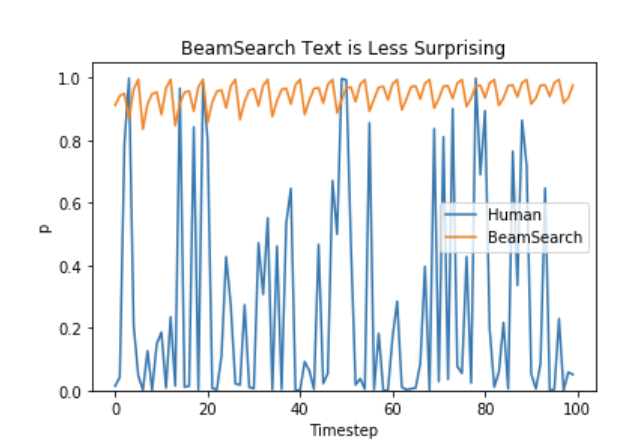
所以,让我们停止无聊,引入一些随机性吧 🤪。
采样
在最基本的形式中,采样意味着根据下一个词 wtw_t 的条件概率分布随机选择它:
wt∼P(w∣w1:t−1) w_t \sim P(w|w_{1:t-1})
以上面的例子为例,下面的图形展示了采样时的语言生成过程。

显然,使用采样的语言生成不再是确定性的。单词 ("car")(\text{"car"}) 是从条件概率分布 P(w∣"The")P(w | \text{"The"}) 中采样得到的,接着从 P(w∣"The","car")P(w | \text{"The"}, \text{"car"}) 中采样 ("drives")(\text{"drives"})。
在 transformers 中,我们设置 do_sample=True 并通过 top_k=0 停用 Top-K 采样(稍后详述)。接下来,出于演示目的,我们将固定随机种子。你可以随意更改 set_seed 参数以获得不同的结果,或者移除它以获得非确定性。
# set seed to reproduce results. Feel free to change the seed though to get different results
from transformers import set_seed
set_seed(42)

# activate sampling and deactivate top_k by setting top_k sampling to 0
sample_output = model.generate(
    **model_inputs,
    max_new_tokens=40,
    do_sample=True,
    top_k=0
)

print("Output:\n" + 100 * '-')
print(tokenizer.decode(sample_output[0], skip_special_tokens=True))
Output:
----------------------------------------------------------------------------------------------------
I enjoy walking with my cute dog for the rest of the day, but this had me staying in an unusual room and not going on nights out with friends (which will always be wondered for a mere minute or so at this point).
有趣!文本看起来还算可以——但仔细一看,它并不十分连贯,听起来也不像是由人类写的。这就是采样词序列时的大问题:模型经常会生成不连贯的胡言乱语,参见 Ari Holtzman et al. (2019)。
一个技巧是通过降低 softmax 的所谓 temperature 来使分布 P(w∣w1:t−1)P(w|w_{1:t-1}) 变得更尖锐(增加高概率词的可能性,降低低概率词的可能性)。
对上面示例应用温度的一个说明可能如下所示。

步骤 t=1t=1 的条件下一个词分布变得尖锐得多,几乎不给单词 ("car")(\text{"car"}) 被选中的机会。
让我们看看如何通过在库中设置 temperature=0.6 来冷却分布:
# set seed to reproduce results. Feel free to change the seed though to get different results
set_seed(42)

# use temperature to decrease the sensitivity to low probability candidates
sample_output = model.generate(
    **model_inputs,
    max_new_tokens=40,
    do_sample=True,
    top_k=0,
    temperature=0.6,
)

print("Output:\n" + 100 * '-')
print(tokenizer.decode(sample_output[0], skip_special_tokens=True))
Output:
----------------------------------------------------------------------------------------------------
I enjoy walking with my cute dog, but I don't like to chew on it. I like to eat it and not chew on it. I like to be able to walk with my dog."

So how did you decide
好的。现在有些不太奇怪的 n-gram 少了,输出也稍微连贯了一些!虽然应用温度可以使分布变得不那么随机,但在极限情况下,当设置 temperature →0\to 0 时,温度缩放采样等同于贪婪解码,并且会遭遇与之前相同的问题。
Top-K 采样
Fan 等人(2018) 提出了一种简单但非常强大的采样方案,称为 Top-K 采样。在 Top-K 采样中,最有可能的下 K 个词被筛选出来,概率质量仅在这些 K 个下一个词之间重新分配。GPT2 采用了这种采样方案,这也是其在故事生成方面成功的原因之一。
我们将上面示例中两个采样步骤使用的单词范围从 3 个单词扩展到 10 个单词,以更好地说明 Top-K 采样。

设定了 K=6K = 6 后,在两个采样步骤中,我们将采样池限制为 6 个单词。虽然最有可能的 6 个单词(定义为 Vtop-KV_{\text{top-K}})在第一步中仅包含大约三分之二的总概率质量,但在第二步中却包含了几乎全部的概率质量。尽管如此,我们看到它成功地消除了第二步采样中相当奇怪的候选词 (“not”、“the”、“small”、“told”)(\text{``not''}, \text{``the''}, \text{``small''}, \text{``told''})。
让我们看看如何通过设置 top_k=50 在库中使用 Top-K:
# set seed to reproduce results. Feel free to change the seed though to get different results
set_seed(42)

# set top_k to 50
sample_output = model.generate(
    **model_inputs,
    max_new_tokens=40,
    do_sample=True,
    top_k=50
)

print("Output:\n" + 100 * '-')
print(tokenizer.decode(sample_output[0], skip_special_tokens=True))
Output:
----------------------------------------------------------------------------------------------------
I enjoy walking with my cute dog for the rest of the day, but this time it was hard for me to figure out what to do with it. (One reason I asked this for a few months back is that I had a
相当不错!这段文本可以说是迄今为止最像人写的文本。不过,Top-K 采样的一个问题是,它不会动态调整从下一个词概率分布 P(w∣w1:t−1)P(w|w_{1:t-1}) 中筛选出的单词数量。这可能会带来问题,因为有些词可能从非常尖锐的分布中采样(上图中的右侧分布),而另一些则从平坦得多的分布中采样(上图中的左侧分布)。
在步骤 t=1t=1 中,Top-K 排除了采样 ("people"、"big"、"house"、"cat")(\text{"people"}, \text{"big"}, \text{"house"}, \text{"cat"}) 的可能性,这些词看起来是合理的候选词。另一方面,在步骤 t=2t=2 中,该方法将可以说是不太合适的词 ("down"、"a")(\text{"down"}, \text{"a"}) 包含在单词的样本池中。因此,将样本池限制为固定大小 K 可能会使模型在尖锐分布下产生乱语,并限制模型在平坦分布下的创造力。这一直觉促使 Ari Holtzman 等人(2019) 创建了 Top-p 或 核 采样。
Top-p(核)采样
Top-p 采样不是仅从最有可能的 K 个单词中采样,而是从累积概率超过概率 p 的最小可能单词集合中进行选择。然后,概率质量在这个单词集合中重新分配。这样,单词集合的大小(又称集合中的单词数量)可以根据下一个单词的概率分布动态增加和减少。好了,这太啰嗦了,让我们可视化一下。

设置 p=0.92p=0.92 后,Top-p 采样会选取最少数量的词,使其累积概率超过总概率质量的 p=92%p=92\%,定义为 Vtop-pV_{\text{top-p}}。在第一个例子中,这包括了最可能的9个词,而在第二个例子中,只需选取前3个词就能超过92%。其实很简单!可以看出,它在下一个词相对难以预测时保留了广泛的词范围,例如 P(w∣"The”)P(w | \text{"The''}),而在下一个词似乎更可预测时仅保留少数几个词,例如 P(w∣"The","car")P(w | \text{"The"}, \text{"car"})。
好了,是时候在transformers中试试了!我们通过设置0 < top_p < 1来激活Top-p采样:
# set seed to reproduce results. Feel free to change the seed though to get different results
set_seed(42)

# set top_k to 50
sample_output = model.generate(
    **model_inputs,
    max_new_tokens=40,
    do_sample=True,
    top_p=0.92,
    top_k=0
)

print("Output:\n" + 100 * '-')
print(tokenizer.decode(sample_output[0], skip_special_tokens=True))
Output:
----------------------------------------------------------------------------------------------------
I enjoy walking with my cute dog for the rest of the day, but this had me staying in an unusual room and not going on nights out with friends (which will always be my yearning for such a spacious screen on my desk
很好,这听起来像是人类写的。嗯,也许还不太像。
虽然理论上,Top-p似乎比Top-K更优雅,但两种方法在实践中都表现良好。Top-p还可以与Top-K结合使用,这样可以避免排名很低的词,同时允许一定的动态选择。
最后,要获得多个独立采样的输出,我们可以再次设置参数num_return_sequences > 1:
# set seed to reproduce results. Feel free to change the seed though to get different results
set_seed(42)

# set top_k = 50 and set top_p = 0.95 and num_return_sequences = 3
sample_outputs = model.generate(
    **model_inputs,
    max_new_tokens=40,
    do_sample=True,
    top_k=50,
    top_p=0.95,
    num_return_sequences=3,
)

print("Output:\n" + 100 * '-')
for i, sample_output in enumerate(sample_outputs):
  print("{}: {}".format(i, tokenizer.decode(sample_output, skip_special_tokens=True)))
Output:
----------------------------------------------------------------------------------------------------
0: I enjoy walking with my cute dog for the rest of the day, but this time it was hard for me to figure out what to do with it. When I finally looked at this for a few moments, I immediately thought, "
1: I enjoy walking with my cute dog. The only time I felt like walking was when I was working, so it was awesome for me. I didn't want to walk for days. I am really curious how she can walk with me
2: I enjoy walking with my cute dog (Chama-I-I-I-I-I), and I really enjoy running. I play in a little game I play with my brother in which I take pictures of our houses.
酷,现在你应该拥有所有工具,让模型用transformers为你写故事了!
结论
作为即席解码方法,top-p和top-K采样在开放式语言生成上似乎比传统的贪婪和束搜索产生更流畅的文本。有证据表明,贪婪和束搜索的明显缺陷——主要是生成重复的词序列——是由模型(尤其是模型的训练方式)造成的,而不是解码方法,参见 Welleck et al. (2019)。此外,正如Welleck et al. (2020)所展示的,top-K和top-p采样似乎也面临生成重复词序列的问题。
在Welleck et al. (2019)中,作者表明,根据人类评估,当调整模型的训练目标时,束搜索可以比Top-p采样生成更流畅的文本。
开放式语言生成是一个快速发展的研究领域,通常没有一刀切的方法,因此必须看看在特定用例中什么最有效。
幸运的是,你可以在transfomers 🤗 中尝试所有不同的解码方法——你可以在这里查看可用方法的概述。
感谢所有为这篇博客文章做出贡献的人:Alexander Rush、Julien Chaumand、Thomas Wolf、Victor Sanh、Sam Shleifer、Clément Delangue、Yacine Jernite、Oliver Åstrand 和 John de Wasseige。
附录
generate已发展为一个高度可组合的方法,具有许多标志,可以在本博客文章未涵盖的多个方向上操作生成的文本。以下是一些有用的页面来指导你:
如果你发现浏览我们的文档有困难,并且不容易找到所需内容,请在此 GitHub 问题中给我们留言。你的反馈对于我们确定未来方向至关重要!🤗
来源:Hugging Face Blog · hf-mirror.com